Timeline Resources for Creative Critical Thinking - Not Just for History Lessons

Critical thinking is thinking about your thinking while you're thinking in order to make your thinking better.
Richard W. Paul

Creativity - Students demonstrate creative thinking, construct knowledge, and develop innovative products and processes using technology. Students will:
  • Apply existing knowledge to generate new ideas, products, or processes.
  • Create original works as a means of personal or group expression.
  • Use models and simulations to explore complex systems and issues.
  • Identify trends and forecast possibilities.

Critical Thinking - Students use critical thinking skills to plan and conduct research, manage projects, solve problems, and make informed decisions using appropriate digital tools and resources. Students will:
  • Identify and define authentic problems and significant questions for investigation.
  • Plan and manage activities to develop a solution or complete a project.
  • Collect and analyze data to identify solutions and/or make informed decisions.
  • Use multiple processes and diverse perspectives to explore alternative solutions.

I have long believed that sketchnotes and infographics are great ways for students to connect concepts. I've always believed that the process of the creation is more important than the final product. Timelines are another great tool to help teachers and students connect important concepts. While traditional timelines focus on sequencing historical events, I believe timelines can be creatively connected to most content areas. Timelines are great for helping students organize thoughts and group concepts. 


Below are a few of our favorite digital resources for creating timelines. What are we missing? How could you use timelines in your classroom? Please share in the comments below.


BookWidgets
Create Interactive timelines using the site's timeline widgets.

Google Autodraw
A drawing tool that pairs the magic of machine learning with drawings from talented artists to help everyone create anything visual.

Add some color to your documents, presentations, and websites with easy to create charts and diagrams.

Slides are a great way to sequence events and the new Grid View can be used to sequence slides connected to a concept or sequence of events. 

This presentation software is a perfect tool for creating a sequence of events. There are even timeline templates to help anyone get started. 

Sutori is a free digital learning tool for the classroom. It enables teachers and students to create interactive stories through a simple and intuitive interface.

Create, collaborate, and publish zooming and panning interactive timelines. It's like Google Maps, but for time.

An open-source tool that enables anyone to build visually rich, interactive timelines.
Create beautiful interactive timelines that you can share on the internet.
Infographic timeline templates with a variety of themes. 

Additional Resources

Learner-Centered Innovation: Spark Curiosity, Ignite Passion and Unleash Genius

I just discovered and ordered a new book that sparked my curiosity. If it is as good as I hope it will be, then I will add it to our book resources once I have a chance to get started reading it. If you've had a chance to read it, would you please share your thoughts in the comments below?


"What if education could be better--for students and for educators? Our changing world demands creative thinkers and collaborative problem solvers, but too often, schools stifle growth and discovery in favor of getting through the curriculum or preparing for "the test." Learning opportunities and teaching methods must evolve to match the ever-changing needs of today's learners. When we tell learners to complete an assignment, we get compliance. When we empower learners to explore and learn how to make an impact on the world, we inspire problem solvers and innovators. This required change in education involves more than providing training for administrators and teachers to implement new curriculum or programs and resources; it demands that we, as teachers and leaders, create an environment where learners at every level are empowered to take risks in pursuit of learning and growth rather than perfection. This book is for you if you are wondering . . . What if learners were valued for their diverse talents and not just our traditional model of "smart"? What if I could create new and better experiences for those I serve? What if I could inspire students to learn, to discover their passions, and to share their ideas with the world?"

Memes for Creative Formative Assessments in Schools


Creativity - Students demonstrate creative thinking, construct knowledge, and develop innovative products and processes using technology. Students will:
  • Apply existing knowledge to generate new ideas, products, or processes.
  • Create original works as a means of personal or group expression.
  • Use models and simulations to explore complex systems and issues.
  • Identify trends and forecast possibilities.

My students and I have used memes several times this year as a creative reflection connected to our learning experiences. Overall, it has been an engaging learning experience.

Here are a few tips based on our experiences:
  1. The students need to be reminded that the memes need to be about the content and concepts first. Some of my students were so focused on being witty or funny that the memes created did not connect well with our topics. 
  2. It is also important to emphasize design. Many of the world's viral memes are funny, but not all show great design. We talk about visual design before, during, and after the creation. Visual Hierarchy for Effective Design
  3. Students need to know that it is ok to search for sample memes and use these as a reference for their own creative ideas. Don't let them get lost in the search!
  4. Provide students with some templates that allow for creative design as a starting point.
    • Meme Templates (Folder with Google Drawings and Google Slides) I personally like to use slides with my students. You can use Google Image Search, a Slides Add-on like Unsplash, or the Explore button to find backgrounds. 
    • Google Drawing Meme Generator created by another educator in my PLN. This is a great tool! So simple and well done!
    • You can also find templates on Adobe Spark Posts website.
    • You can also start with PicMonkey. Make a Meme with PicMonkey

How would you use memes for creative student engagement?


Culturize: Every Student. Every Day. Whatever It Takes is Our Book of the Month - February 2018

The best educators are not content to do the same old thing year after year. Innovative educators push their thinking by engaging in social media, exploring blogs, attending conferences, and exploring the newest generation of educational books.

We've created a site to organize and share some great books connected to teaching and learning. Each month we will feature a new book from our PLN. Have an idea for our next book of the month? Please share in the comments below.
"Understand it takes more than one conversation to influence change – an initial conversation is a great start, but the real change comes from the ongoing follow-up conversations. Make the time to make change happen 100 conversations at a time.Jimmy Casas

Featured Book for February

by Jimmy Casas

Eradicate Average! CULTURIZE Your School. Average schools don't inspire greatness--and greatness is what our world needs if we are going to produce world-changing learners. In Culturize, author and education leader Jimmy Casas shares insights into what it takes to cultivate a community of learners who embody the innately human traits our world desperately needs, such as kindness, honesty, and compassion. His stories reveal how these "soft skills" can be honed while meeting and exceeding academic standards of twenty-first-century learning.

You'll learn...

  • How to reach those who seem unreachable. 
  • What to do when students disengage or drop out of school. 
  • How to ensure your learners feel cared for and empowered. 
  • How to create an environment where all learners are challenged and inspired to be their best.

What Tools are EdTech Coaches Using to Enhance Engagement?

The ISTE EdTech Coaches Network has been engaged in a Book Study and Slow Chat using the Hashtag #ETCoaches. The focus is on using technology to enhance learning and engage students. 


The weekly discussions have been great, but two questions this week really caught my interest.

I will be the first to tell you that you need to know why you are doing something before focusing on how or what. I do not believe that there is not a tech tool in existence that can enhance engagement if the teacher and the student don't know why they are using it. 

"Work with purpose is passion. Work without purpose is punishment."
Jillian Michaels

Here are some of the tech tools that the EdTech Coaches shared. I believe these are tools being used with a purpose in classrooms across the world. These are roughly in order, with the most mentioned first. 

What purpose could you find for each of these tools?

Padlet - It works like a sheet of paper where you can put anything (images, videos, documents, text) anywhere, from any device (pcs, tablets, phones), together with anyone.


Seesaw - Student driven digital portfolios and simple parent communication.


Flipgrid - A video response platform where educators can have online video discussions with students or other educators.


Pear Deck - Interactive, engaging slide presentations to your classroom. Real-time formative assessments and discussions enhance understanding and empower your students' learning process.


Kahoot - A game-based platform that makes learning awesome for millions of people all over the world.


Insert Learning - Insert instructional content on any web page. InsertLearning is a Chrome extension that lets you turn websites into interactive lessons.

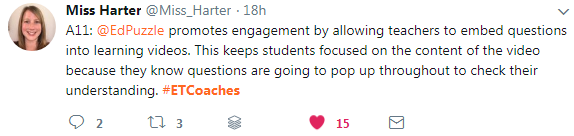
EdPuzzle - Make any video your lesson. Pick a video, add your magical touch and track your students' understanding.


These are not the only tools mentioned, but they were the most common.


Top Posts